

Client area
WhatsApp+54 9 3447 41-2322 Emailinfo@paginasclover.com

Professional websites that make your business grow.

We design, build and maintain your website. Ready for Google and AI assistants.

Verified security: A+ on three independent scanners

What is Páginas Clover and how much does it cost?

Páginas Clover is an Argentine studio that designs, builds and maintains websites for businesses. We serve Gualeguay, Colón and all of Entre Ríos, and online across Argentina. A website costs from US$200 for development, plus a monthly plan from US$20. We make it ready for Google and for AI assistants such as ChatGPT.

Updated

Our specialties

Where we focus.

The areas where we make a difference in every project.

  • 01

    CEO Dashboard

    An executive dashboard that shows you how your business is doing: clients, revenue, pending payments — all in one place.

  • 02

    SEO for AI

    We structure your content so ChatGPT, Gemini and traditional search engines can find you — and recommend you.

  • 03

    Copywriting

    We write your site's copy around your real business, not generic templates.

  • 04

    Design styles

    You choose the visual style that represents you best — minimal, warm, corporate — not a one-size-fits-all mold.

  • 05

    Special features

    Built-in apps, user account systems and custom features — whatever your business needs.

  • 06

    Real security

    We protect your site and your customers' data from day one: mandatory HTTPS, modern security headers and an admin panel with two-step verification.

Verified security

A+ on three independent scanners.

You don’t have to take our word for it: tap any grade and the scanner checks this website live.

See how it compares with a typical website
A typical website compared with a Páginas Clover website
AspectA typical websitePáginas Clover
Security headersRarely configuredA+ verified
Panel with two-step verificationRarelyMandatory
PasswordsSometimes stored badlyStored as hashes (bcrypt or Argon2id)
Client dataNext to the public websiteKept separate, with automatic backups
StatisticsWith third-party trackersOur own, no cookies
Security reviewNoIndependent, before going live

“A typical website”: what we often see on sites built from templates or left without maintenance; it does not refer to any specific website.

Start for free

Want to know exactly how we can help you?

If you already have a website

US$0 review

Ask us for a free review.

With a breakdown of what you could improve: design, copy, speed and how easy you are to find.

Get a free review of my site
If you don't have one yet

US$0 proposal

We'll put together an initial proposal, completely free.

Sections, content and contact options designed for your business — before you commit to anything.

Get my free proposal

Portfolio

Sites and demos we've built.

Sites we've built.

How we work

How do we work, from idea to a working website?

A clear four-step process, whether you already have a site or are starting from scratch.

  1. Initial review

    We review your current site (if you have one): design, navigation, speed, SEO and how easily search engines and AI systems can find you.

  2. Site proposal

    We define sections, content, images, forms and contact buttons before writing a single line of code.

  3. Development

    We build your site for phone, tablet and desktop, with technical SEO basics from day one.

  4. Improving existing sites

    You don't always need to start over: we also improve the design, copy, speed and SEO of the site you already have.

Core development

What does the website build include?

  • Website design and development
  • Optimized for phone, tablet and desktop
  • Setup of your own content
  • Contact forms and buttons
  • Technical SEO basics
  • Clear structure for traditional search engines
  • Content designed for AI (ChatGPT, Gemini, etc.)
  • Clear calls to action for your customers

After launch · Monthly maintenance

A website doesn't have to stay the same forever. Your services, prices, contact details and images change — and search engines and AI systems keep evolving too.

  • Bug fixes
  • Backups
  • Content updates
  • SEO improvements
  • and more

Plans & pricing

How much does it cost, and which plan to choose?

Option 1 — Website + monthly maintenance

Initial build for US$200, plus one of these monthly plans:

Basic

US$20/mo

For businesses that need their site to stay up, running and up to date.

See what's included
  • Technical maintenance
  • Bug fixes
  • Backups
  • Technical and security updates
  • Small content changes
  • Basic site check-ups
  • Ready-to-share Google review links
  • Verified A+ security
  • Monthly security check with 3 independent scanners
Choose Basic
Most popular

Growth

US$30/mo

For businesses that want to keep improving their site over time.

See what's included
  • Everything in Basic
  • More frequent content updates
  • Basic SEO improvements
  • Search visibility check
  • Optimization for AI search
  • Small design and structure improvements
  • Verified A+ security
  • Monthly security check with 3 independent scanners
Choose Growth

Growth + Content

US$40/mo

For businesses looking for ongoing development and optimization.

See what's included
  • Everything in Growth
  • New small sections
  • Content updates
  • Small landing pages
  • Ongoing SEO improvements
  • Regular site optimization
  • Verified A+ security
  • Monthly security check with 3 independent scanners
Choose Growth + Content

Option 2 — Website without maintenance

You pay once for the website build, with no monthly plan. Future updates, new sections or technical work are quoted separately, based on what you need.

Verified A+ security

US$400one-time payment Inquire

Premium services

Advanced features for businesses ready to level up.

They can be added to any of the plans above and are quoted separately, based on what your business needs.

Gestión de Clientes Pro

US$200

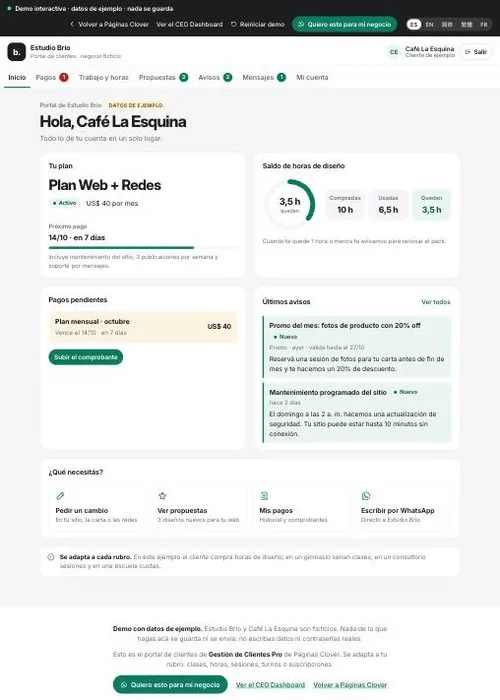
Our client management system: we turn your existing customer database into an online system built right into your website. Each client gets their own profile, and you manage clients, subscriptions and payments from a private dashboard.

See what clients and the admin can do

For your clients

  • Create and access their personal account
  • See their subscriptions and services
  • Check the status of their payments
  • Receive messages and notifications
  • See promotions, news and offers
  • Interact with your business through the website
  • Leave feedback on the service

For the admin

  • See all clients from a private dashboard
  • See who has paid and who has pending payments
  • Manage subscriptions and payment statuses
  • Update client information
  • Send messages or payment reminders
  • Post promotions that appear on client profiles
  • See your clients' feedback, with an alert if someone wasn't happy

Try the Client area demo

+ Expand it with

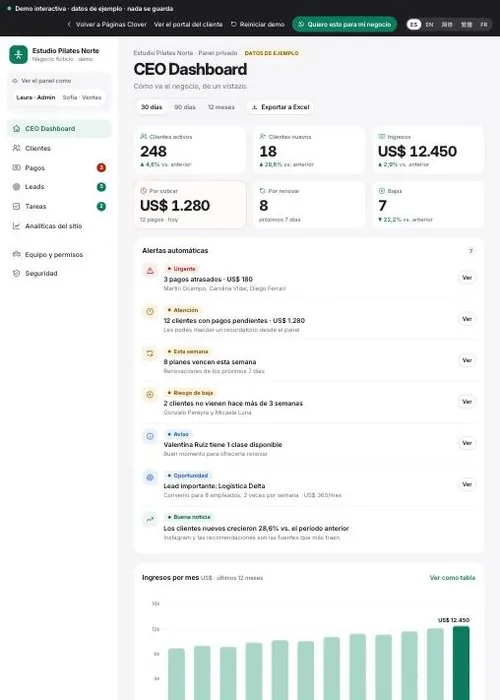
CEO Dashboard

Instead of checking client by client, the system shows you how your business is performing. It helps you answer:

  • Am I getting more clients?
  • How much am I making?
  • How many are leaving?
  • Where are they coming from?
  • Which service performs best?
  • Which client needs attention?

Try the CEO Dashboard demo

This monthExample
Active clients248
New18
RevenueUS$12,450
PendingUS$1,280
Due to renew23
Cancelled7
  • 12 clients have pending payments.
  • 8 subscriptions expire this week.
  • New clients are up compared to last month.
See everything the CEO Dashboard includes

Analytics & reports

  • Executive dashboard: active and new clients, revenue, pending payments, renewals and cancellations
  • Real-time analytics on clients, revenue and activity
  • Revenue by service, subscription or client type
  • Payment summary: collected, pending and overdue
  • New vs. returning clients, and who's about to leave
  • Subscriptions: active, due to renew, cancelled and expired
  • Where clients come from: Google, Instagram, Facebook, website, campaigns
  • Conversion: from website visit to client
  • Monthly reports on clients, revenue and performance
  • Data export to Excel/CSV

Automation & management

  • Automatic alerts: overdue payments, expiring subscriptions, important new clients
  • Client segmentation by type, service, status, location or value
  • Each client's activity: when they log in, what they look at, what they do
  • Marketing hub: promotions for specific groups of clients
  • Automated campaigns: payments, renewals, promotions, birthdays, news
  • Employee/admin accounts with different access levels
  • Activity log: who changed which information, payments or clients
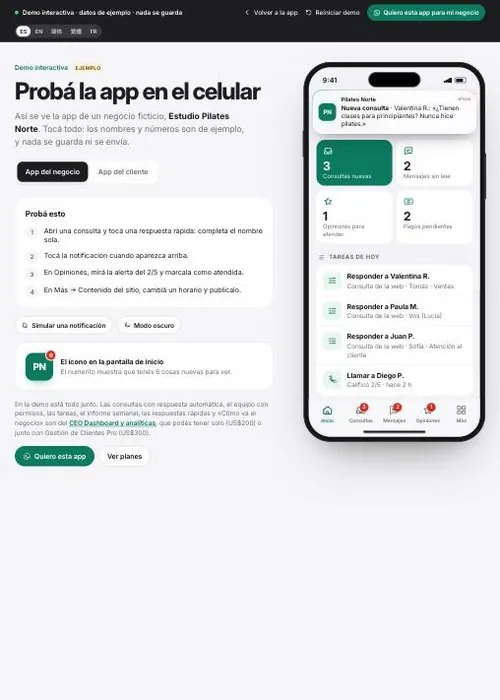
  • Mobile dashboard: the owner checks how the business is doing right from their phone

Put simply: the client system helps you manage your clients. The CEO Dashboard helps you understand your business and make decisions based on real data.

Gestión de Clientes Pro onlyUS$200one-time paymentInquire
CEO Dashboard and analytics onlyUS$200one-time paymentInquire
Gestión de Clientes Pro + CEO DashboardUS$300one-time paymentYou save US$100 compared to buying them separately+ app on Google Play and the App Store (coming soon)Inquire

Discover the app Try the app demo

Custom features

Need something more specific?

Add them based on what your business needs. Each one is quoted separately, depending on scope.

Client loyalty

  • Referral and points programClients earn rewards for bringing in someone new or renewing.
  • Custom surveysClient feedback already comes with Gestión de Clientes. Custom: your own questions after each service.
  • Reviews and testimonialsHappy clients leave a review and it's published on your website.

Operations

  • Digital signatureContracts and authorizations signed right from a phone.
  • IntegrationsGoogle Calendar, accounting, email marketing and other tools you already use.
  • Multi-locationSeveral locations in one system, with separate figures and data.
  • Installable appAlready included with Gestión de Clientes. For a site without a dashboard, it can also be installed on the phone as an app.

FAQ

Questions about web design and development.

How much does a website cost?

The initial build costs US$200 if you continue with a monthly maintenance plan (from US$20/month), or a one-time US$400 if you'd rather skip maintenance.

Is monthly maintenance required?

No. You can pay US$400 once for the site, with no monthly plan. Future updates are quoted separately depending on the work.

Can you improve a website I already have instead of building a new one?

Yes. We can improve the design, navigation, copy, speed and SEO of an existing site — no need to build a whole new one.

Are your sites optimized for AI as well as Google?

Yes. Beyond traditional SEO, we structure your content so AI-powered search tools like ChatGPT or Gemini can understand and recommend your business.

How secure are the websites you build?

This website and the ones we built with the same system (Préstamos Clover and Spanish with Emi) get an A+ on Mozilla HTTP Observatory, SecurityHeaders.com and Qualys SSL Labs. The results are on our security page, with links so you can verify them.

What happens to my clients’ data?

It is stored outside the public part of the website, with automatic backups. The panel requires two-step verification, passwords are stored as hashes and each client sees only their own data. Statistics are our own, with no cookies and no stored IPs.

How can I check the security?

Go to our security page and tap any of the three scanners: they check the site live and show you the grade. You can also ask us for a free security review of your own website.

Installed. Ready for you.

Ready for a website that works for you?

Tell us about your business and we'll help you choose the best plan to get started.

Tell us about your project.

Your inquiry

Do you already have a website?

Fields marked * are required. By sending, you accept the Privacy policy.

Start for free

Request your free review

Leave your contact (email, LINE, WeChat or WhatsApp) and we'll get back to you very soon.

By sending, you accept the Privacy policy: we keep this information only to reply to you.

Specialty 01

CEO Dashboard

An executive dashboard that shows you how your business is doing: clients, revenue, pending payments — all in one place.

What is it?

It's a dashboard where you see at a glance how your business is doing today: how many clients you have, how much money came in, which payments are pending — no more digging through notebooks or scattered spreadsheets.

A real-life comparison

Think of your car's dashboard: you don't open the hood to find out if you're running out of gas — the dashboard shows you everything together, at a glance. Running a business without a dashboard is like driving with tape over the gauges — you might get there, but you're driving blind.

How it works on your website

We build a private dashboard, just for you, connected to your website. There you see in real time how many inquiries came in, what's most requested and the status of pending payments — all organized, with no spreadsheets going out of date.

I want this on my site

Specialty 02

SEO for AI

We structure your content so ChatGPT, Gemini and traditional search engines can find you — and recommend you.

What is it?

It's how we help Google — and also ChatGPT, Gemini and other AI assistants — understand exactly what your business does, so they can recommend you when someone searches for something related.

A real-life comparison

Imagine you take a photo of your dog and save it on your phone. If you never tell it “this is a photo of Chico, my dog”, once you have 1,000 photos it'll be really hard to find. Give it that information and your phone organizes it, so you find it instantly. A website works the same way: looking nice isn't enough — you have to tell search engines what's in each part.

How it works on your website

We structure every heading, image and section of your site with the information search engines and AI need to understand what you offer, where you are and who you serve — so when someone asks “where can I find [your service] near me?”, your business shows up.

I want this on my site

Specialty 03

Copywriting

We write your site's copy around your real business, not generic templates.

What is it?

It's writing your website copy around your real business — your customers, the way you talk to them, what makes you different — instead of copying generic phrases that could be on any site.

A real-life comparison

It's the difference between a tailored suit and a one-size-fits-all one off the rack. The one-size suit “fits”, but you can tell it wasn't made for you. Generic copy “works”, but it convinces no one, because it doesn't sound like you or answer your customer's specific question.

How it works on your website

Before writing a single word, we get to know your business: what your customers always ask you, what sets you apart, what tone you use. With that, we craft copy that explains clearly, builds trust and gets people to reach out to you.

I want this on my site

Specialty 04

Design styles

You choose the visual style that represents you best — minimal, warm, corporate — not a one-size-fits-all mold.

What is it?

It's choosing the visual style — colors, typography, photos, how information is organized — that best represents your business, instead of a generic template that could belong to any industry.

A real-life comparison

It's like a shop window. A serious pawn shop doesn't dress its window like a kids' ice cream parlor, even though both need an attractive one. The right style isn't “the prettiest” in the abstract — it's the one that makes the right person trust you the moment they walk in.

How it works on your website

We show you several possible visual directions — minimal, warm, corporate and more — and build your site with the one that best conveys professionalism, approachability or whatever your business needs to say first.

I want this on my site

Specialty 05

Special features

Built-in apps, user account systems and custom features — whatever your business needs.

What is it?

They're custom features that go beyond an informational page: built-in apps, systems where your customers create an account, booking panels, online payments, or any specific tool your business needs.

A real-life comparison

A basic website is like a shop with a sign and a counter. Special features are like adding a connected cash register, a booking system or an ordering app — it's the same shop, but now it can run on its own.

How it works on your website

If your business needs customers to log in and see their history, book an appointment, make a payment or use your own tool inside your website, we build it to measure — connected to the rest of the site, so it never feels like a bolt-on.

I want this on my site

Specialty 06

Real security

We protect your site and your customers' data from day one: mandatory HTTPS, modern security headers and an admin panel with two-step verification.

What's included

See the evidence

I want this on my site